

Video: The Best Attribution Model?!?
In this premier episode of Happy Hour Analytics, Keith and Scott break down the good, bad and ugly of the most popular attribution models

Ad Tracking

An attribution window is the length of time a marketing touchpoint can still get credit for a conversion. Ad platforms measure it forward from the ad click. For example, Meta’s default attribution window is 7 days, so if someone clicks your ad today and buys 40 days later, that ad gets no credit for the sale. The attribution window you choose can impact which channels appear to drive your revenue.
That’s worth repeating: The attribution window you choose impacts the conclusions you can draw from your data. That’s why it’s so important to understand attribution windows (and select the right one for the analysis you want to do).
This article gives you the essentials.
Think of an attribution window like a timer. It starts the second someone interacts with your ad. It asks one question: “Did a conversion happen before time ran out?” If the purchase happens before the time runs out, the ad platform takes credit. If it happens afterward, the ad platform doesn’t take credit.
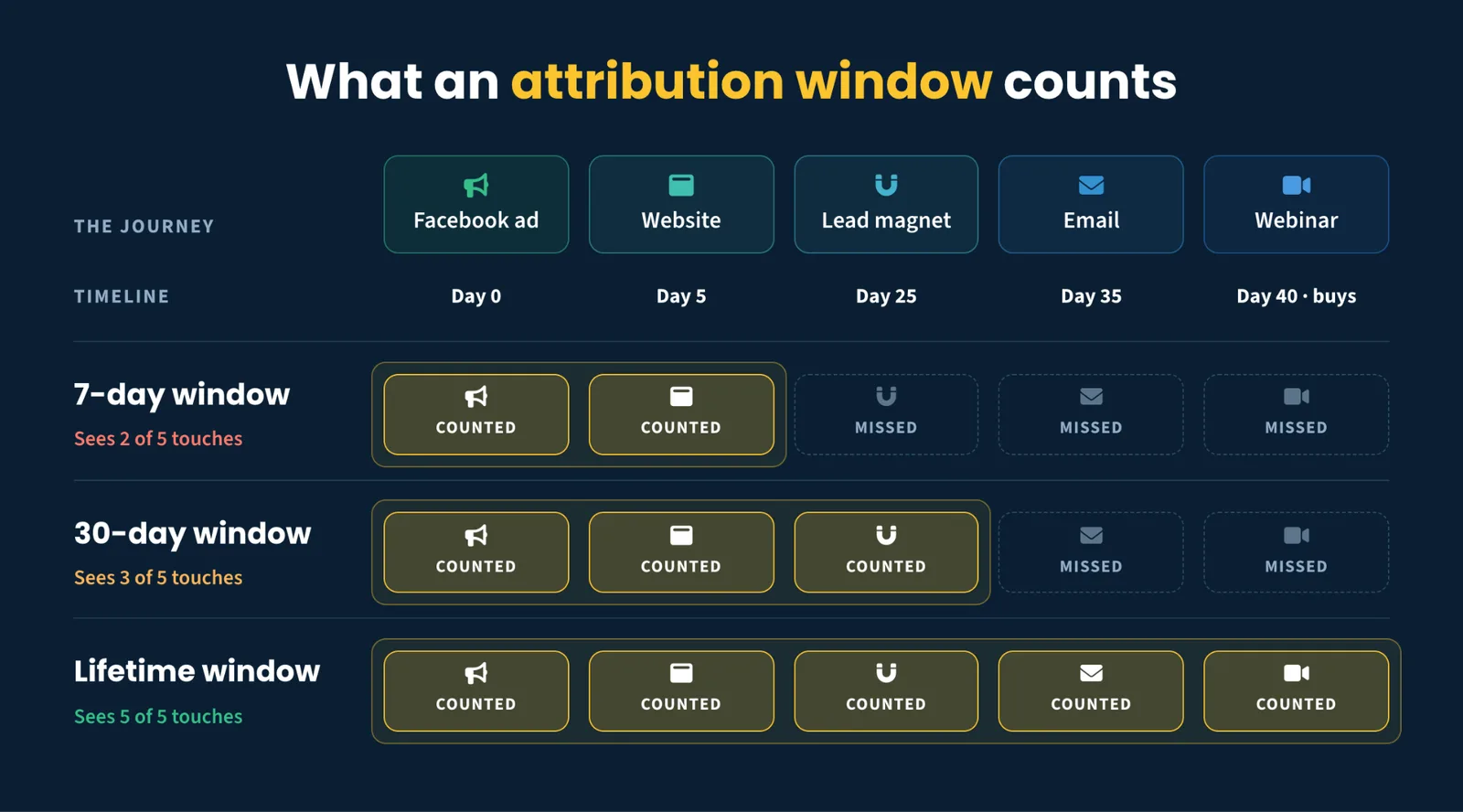
In the above example, you’ll note that the customer journey was a success. After clicking an ad (day 0), the user returned to the website (day 5), opted in via a lead magnet (day 25), read an email (day 35) and purchased via a webinar (day 40). Success!
However neither the 7-day or 30-day attribution window counted that conversion because it happened on day 40.
Only with lifetime attribution was this conversion correctly tracked back to the original ad. (More on how this works later.)
There are two common types of attribution windows:
Click-through windows: How long after someone clicks an ad can a conversion be credited to that ad? This is usually the stronger and more actionable signal because the person took an explicit action.
View-through windows: How long after someone is served or views an ad — without clicking the ad — can a conversion still be credited to that ad? This window is usually short because an impression with no click isn’t great evidence that the buyer was influenced by the ad.
There are two key things to note here:
You’ll also hear the terms lookback window and conversion window. Some people and platforms use these terms synonymously. They’re closely related, but they’re measured from opposite ends:
| Term | How it measures conversions | Often used by |
|---|---|---|
| Attribution window | Forward from the ad click | Meta / most ad platforms |
| Conversion window | Forward from the ad click | Google Ads |
| Lookback window | Backward from the conversion | GA4 / CRM tools |
An attribution window asks, “Did they buy within ___ days after the click?” A lookback window asks, “which touches happened in the ___ days before this sale?”
For some businesses with very short and simple funnels, the “attribution window” and the “lookback window” might be the same. This is common in e-commerce where most sales go straight from an ad click to a purchase.
For businesses with longer and more complicated funnels, the attribution window and the lookback window might be different. This is common in B2B SaaS, coaching, info product and other nurture-dependent sales funnels.
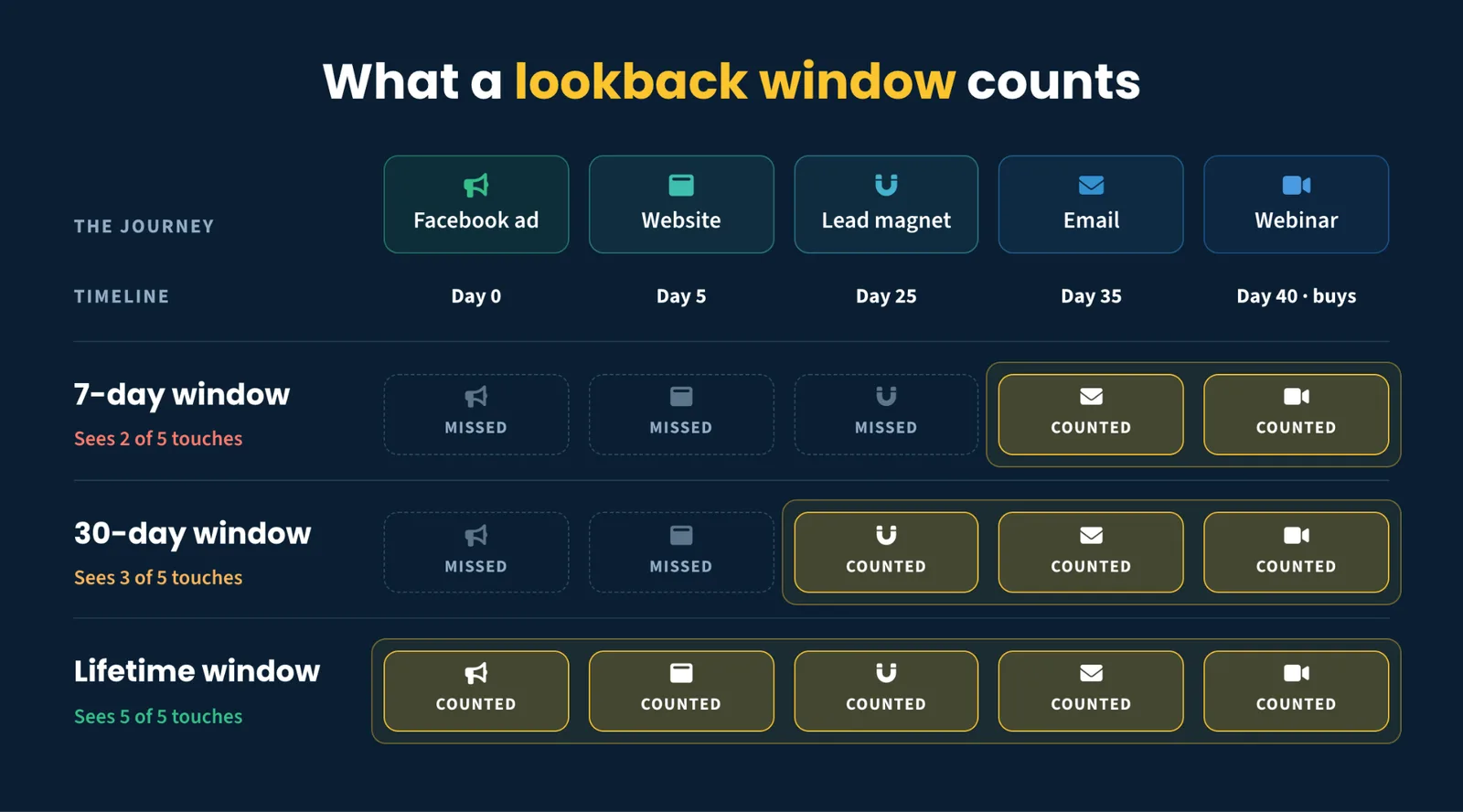
In the above example, notice what the 7-day and 30-day lookback windows include when assigning credit for a conversion (and what they omit). Again, only the lifetime window includes all of the steps.
So, attribution window vs. lookback window? While these terms are not standardized, what matters most is the direction and the scope, not the label.
Ad platforms look forward from their ad. Google Analytics and CRM tools look backward from your sale. Attribution Engines (like SegMetrics) allow you to look in either direction. And each may use different window lengths.
Well, that depends. There’s no standard.
Each platform sets its own default attribution window. (This is another reason why Facebook, Google, and your CRM never tell you the same story… and why having a single source of truth is so important.)
As of 2026, here are the current default click-through and view-through windows for the most common ad platforms:
| Platform | Default click-through window | Default view-through window | Max click window |
|---|---|---|---|
| Meta (Facebook & Instagram) | 7 days | 1 day | 7 days |
| Google Ads | 30 days | 1 day | 90 days |
| TikTok | 7 days | 1 day | 7 days |
| 30 days | 7 days | 90 days | |
| X (Twitter) | 30 days | 1 day | adjustable |
What do you notice about these attribution windows?
Fine print note:
Meta overhauled parts of its attribution reporting in early 2026. It removed several legacy attribution-window breakdowns—including the 28-day click breakdown from relevant Ads Insights reporting—and introduced a separate “engage-through” category for qualifying non-link ad interactions. Because available settings and definitions can vary by campaign and account, always confirm the current configuration in your own Ads Manager. See the official documentation for Meta attribution settings, Meta’s Ads Insights API changes, and Google Ads conversion windows for more details.
One clarification: the attribution window is not the same thing as the attribution model.
The window decides which touches are eligible for credit. The attribution model decides how those eligible touches split the credit. For example, a first-touch attribution model gives 100% of the credit to the first click while a linear attribution model evenly distributes credit across all touchpoints. But any touchpoints that occurred outside the attribution window won’t be considered by the attribution model.
Also, an attribution window is not the same as tracking.
Again, this is another reason why lifetime attribution is so critical.
As a rule, the longer your attribution window, the safer. You can always narrow a long window, but you can’t recover data that a short window never captured.
At a minimum, you should set an attribution window that is the real length of your sales cycle. This might be longer or shorter depending on your business.
The most accurate attribution window, to show you the full picture of your funnel, is lifetime attribution. This requires a third-party attribution tool that pulls data from all of your marketing tools (ad platforms, CRM, payment processor, email, etc.) and tracks all visitors on your site.
What is an attribution window? An attribution window is the length of time a marketing touchpoint can still get credit for a conversion. Ad platforms measure it forward from the ad click. If the purchase happens inside the attribution window, the ad gets credit. If it happens after the attribution window closes, the ad doesn’t get credit. The window you choose can impact which channels appear to drive your sales. For a high-level overview of marketing automation, check out our Complete Guide to Marketing Automation.
What’s the difference between an attribution window and a lookback window? They define the eligible period for assigning credit for a conversion from opposite ends. An attribution window is measured forward from the ad click (“Did they buy within X days after clicking?”). This is how ad platforms frame it. A lookback window is measured backward from the conversion (“Which touches happened in the X days before the sale?”). This is the way many CRM tools frame it. Many people use the terms interchangeably, which can cause confusion.
Is a conversion window the same thing? Yes. “Conversion window” is Google Ads’ name for its attribution window. This is the period after an ad interaction during which a conversion can be credited to it. Different platforms, different labels, same underlying idea.
What is Meta’s default attribution window? As of 2026, Meta (Facebook and Instagram) defaults to a 7-day click-through window and a 1-day view-through window, and no longer offers a 28-day click window for optimization. For long sales cycles, that 7-day cap undercounts the ads that acquired the customer weeks or months earlier.
What attribution window should I use? Match it to your sales cycle and your question. Use a short window to see what triggered an immediate action, and a long (or lifetime) window to see where customers came from and what drove the eventual purchase. When in doubt, go longer — you can’t recover data a short window never counted. Be sure you have cross-device tracking so you can see the full customer journey, regardless of length.
Your customers don’t decide in a week, so your data shouldn’t expire in one. A lifetime attribution window shows every touch — from first click to purchase — no matter how long the journey takes and no matter which platform stopped watching.
Start your free 14-day trial of SegMetrics to unlock lifetime attribution for your business.

Keith is the Founder of SegMetrics, and has spent the last decade working on optimizing marketing funnels and nurture campaigns. SegMetrics was born out of a frustration with how impossibly hard it is to pull trustworthy, complete and actionable data out of his client’s marketing tools.
In this premier episode of Happy Hour Analytics, Keith and Scott break down the good, bad and ugly of the most popular attribution models

One of the biggest challenges when running ads is measuring accurate attribution data. This is difficult for a number of…

Guide, Articles, Tracking & Reporting
In a world where marketing is driven by data, understanding how your data is analyzed is just as important as…

Start your 14-day free trial of SegMetrics today!